
Vink SPI's, General Laws and other standards
This page can only be accessed by Vink employees.
If you have already registered for the single sign on access, click here to log on.
We will now make the SPIs available in an automated and secure manner, therefore you need to follow the steps below to access the portal.
Please read the instruction below first, before accessing the SPIs.
1 . After clicking on the
CONTINUE
link, you will first be shown the screen below.

2. Click on VINK USER. After clicking on it, the screen below will appear. Enter your RDS account name here.
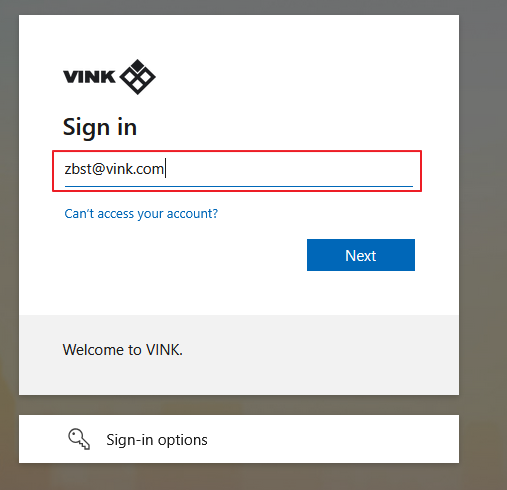
3. Click Next. The screen below will then appear. Enter your password here.

4. Click on Sign In. The screen below will appear. You can click ‘Yes’ and optionally ‘Don’t show this again’.
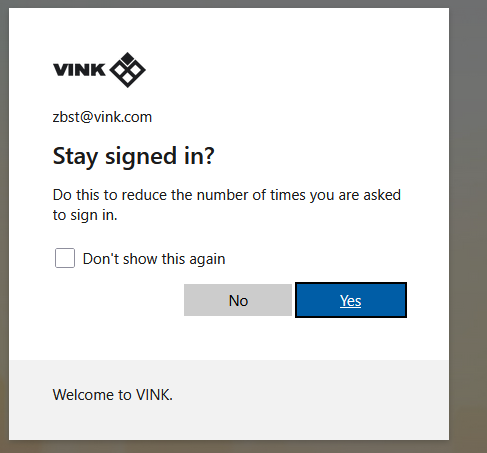
5. After this, you will be redirected to wecomply-vink.monday.com. This environment contains the SPIs.
CAUTION when logging in for the first time, you will get the screen below. Tick ‘I agree to the Terms of Service and Privacy Policy’.
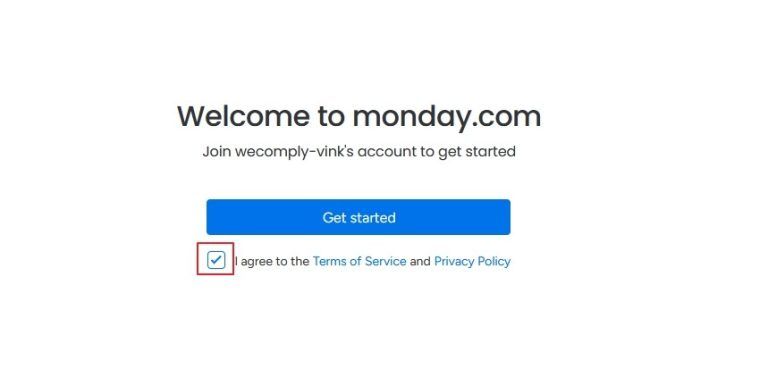
6. After this, you are logged into weCOMPLY by Vink. You can ignore any messages from Monday and click away.
If you have problems logging in, send an e-mail to support-vink@grcguard.com.
Click on CONTINUE to log in
